
CourseClawAI Review: The Short Version
Building an online course sounds straightforward until you start listing everything involved.You need the lessons. Then quizzes. Then somewhere to host everything. Students need accounts. You need a sales page, payments, certificates, marketing material, and ideally some way of answering student questions. CourseClawAI Review
CourseClawAI is trying to put most of those jobs inside one system.
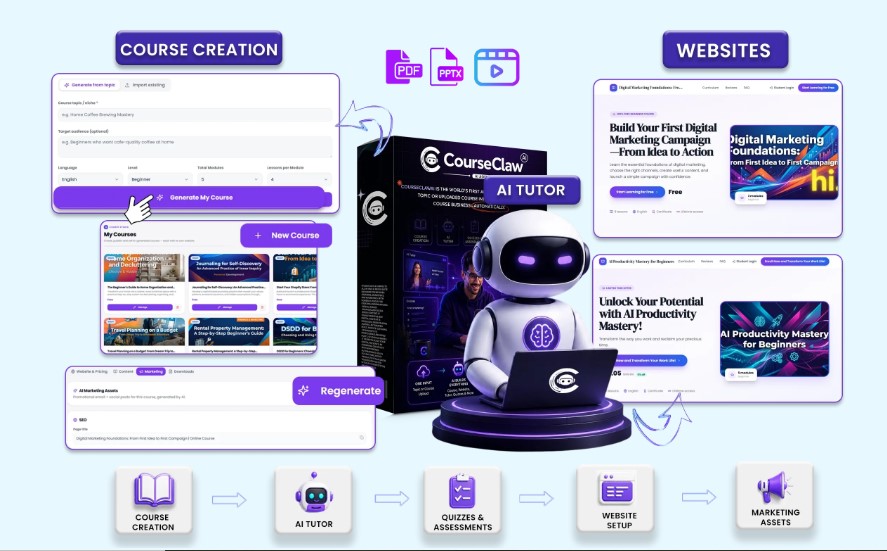
Instead of starting with an empty course dashboard, you can give the platform a topic or upload material you already have in PDF, DOCX, PPT, or video format. According to the official product page, the system can then help create the course structure, lessons, assessments, website, student experience, tutor, and marketing assets.
That makes the offer interesting for someone who has knowledge or an idea but doesn’t want to assemble five or six separate tools.
There is an important caveat, though. CourseClawAI makes some ambitious promises on its sales page. Buyers should still expect to review, edit, fact-check, customize, and market whatever they publish. Software can shorten the setup process; it can’t guarantee that people will want to buy your course.
Visit the Official CourseClawAI Website
Quick Verdict : CourseClawAI Review
CourseClawAI looks most useful for: creators, coaches, freelancers, marketers, and beginners who want one place to build and package an online course.
Strongest point: it covers much more than lesson creation. The front-end offer includes course websites, student tools, assessments, payment support, certificates, marketing assets, hosting, and commercial rights.
Biggest concern: the funnel and upgrade pricing shown across the vendor’s own pages aren’t perfectly aligned. Check the actual checkout carefully before purchasing additional upgrades.
Current advertised front-end price: $14.95 one-time on the sales page. The live checkout I reviewed displays $14.94 before optional additions. CourseClawAI Review
Refund period: 30 days according to both the product page and checkout.
Overall view: Worth considering at the launch price if its broad toolset matches what you’re actually planning to build. Don’t buy it simply because of income claims on the sales page.
What Is CourseClawAI?
CourseClawAI is a cloud-based platform designed around creating and launching online courses.
Its workflow starts in one of two ways:
You can enter a topic and build a course from that starting point, or upload material you already own. The officially supported upload formats listed on the sales and JV pages include PDF, DOCX, PPT, and video.
From there, CourseClawAI is designed to cover several parts of the course-business workflow rather than stopping after producing lessons. CourseClawAI Review
The official materials list course creation, websites, quizzes, assignments, assessments, a student dashboard, certificates, payments, marketing assets, SEO tools, a course-specific tutor, hosting, SSL, multi-language support, and commercial use.
That broader scope is really the main reason to look at CourseClawAI.
If all you need is a place to type lessons, much of the platform would be unnecessary.
If you’re starting with an idea and need the surrounding infrastructure as well, it makes more sense.
Key CourseClawAI Features :CourseClawAI Review
1. Course Creation From a Topic
You can begin with a subject instead of building every lesson manually.
The vendor says CourseClawAI can research the topic, organize the curriculum, create modules and lessons, and prepare supporting materials such as quizzes, assignments, assessments, and workbooks.
The practical benefit is speed at the drafting stage.
However, I wouldn’t treat automatically prepared educational material as finished teaching material. Anyone selling a serious course should still review facts, examples, lesson order, difficulty, and relevance before students see it.
2. Existing Course Uploads : CourseClawAI Review
This may actually be more useful than starting from a topic for experienced creators.
CourseClawAI accepts existing material in PDF, DOCX, PPT, or video form and is designed to build a course environment around that material.
So, for example, someone with workshop slides or a training document doesn’t necessarily need to rebuild everything manually inside another LMS.
3. Course Website Builder
CourseClawAI doesn’t stop after preparing lessons.
The front-end sales page says it can build a responsive course website containing the selling experience, student login/dashboard, payment integration, and course-delivery features. Hosting and SSL are also listed as included.
That can reduce the number of separate services a beginner needs to configure.
4. Student Dashboard
Students need somewhere to access what they’ve purchased.
The platform includes a student dashboard, while the sales page also references student management and progress tracking.
This is an important distinction between CourseClawAI and a basic course-writing utility.
You’re getting tools aimed at delivering the finished product, not merely preparing it.
5. Quizzes, Assignments and Assessments
CourseClawAI can prepare quizzes, assignments, and assessments around course material.
For educational courses, this can make lessons feel more structured than a collection of videos or PDFs.
Again, subject experts should review the questions before publishing them. Poorly written assessments can confuse students even when the lesson itself is good.
6. Course-Specific Tutor
The product includes a chatbot-style tutor trained around the course material. The vendor says students can use it for questions and lesson explanations, with multi-language support also listed.
This could be helpful for courses where students regularly ask similar questions.
It isn’t a substitute for the creator’s expertise, especially when students need nuanced or high-stakes answers.
7. 450+ Done-for-You Courses
CourseClawAI includes a library of more than 450 ready-made courses.
The sales page says they can be imported and edited, allowing users to start with existing material rather than building every course from scratch.
That sounds convenient, but customization matters.
If other buyers receive access to the same library, publishing a course unchanged gives you little differentiation. Changing the positioning, examples, branding, lessons, and supporting resources would make more sense.
8. Marketing Assets
The platform can prepare supporting promotional material including sales-page copy, landing-page material, email material, social content, SEO assets and basic traffic-related resources.
This can remove another blank-page problem after the course itself is finished.
However, creating promotional material and generating actual traffic are two different things. You still need an audience, traffic source, outreach strategy, advertising, SEO work, partnerships, or another reliable acquisition method.
9. Payment and Certificate Features
Payment integration and course-completion certificates are part of the advertised feature set.
Both are small details compared with course creation, but they’re exactly the kind of details that make launching a course more complicated when they have to be assembled separa
10. Commercial Licens : CourseClawAI Review
The front-end offer advertises a commercial license.
The sales page specifically says users can create courses for themselves or provide course-creation services to clients, subject to the applicable license terms.
That’s potentially useful for freelancers.
Just don’t confuse commercial usage rights with the separate reseller or white-label upgrades. They aren’t necessarily the same permission.
How Does CourseClawAI Work?
The official workflow is fairly straightforward.
Step 1 – Provide the Starting Material
Enter the course topic or upload an existing PDF, DOCX, presentation, or video.
Step 2 – Build the Course
The system prepares the course structure and supporting material, then builds the surrounding course website and student-facing elements.
Step 3 – Review and Customize : CourseClawAI Review
This is the step buyers shouldn’t skip.
Check the curriculum, remove weak material, correct errors, add your own experience and examples, improve branding, and make sure assessments genuinely match the lessons.
Step 4 – Configure Selling : CourseClawAI Review
Connect the relevant payment setup, review the sales page, test student access, and check the website on mobile and desktop.
Step 5 – Publish and Promote : CourseClawAI Review
Once everything is ready, publish the course and start bringing potential buyers to the offer.
The vendor describes a much more automated end-to-end flow, but reviewing before publishing is the safer practical approach.
Practical Benefits of CourseClawAI
The biggest benefit isn’t any single feature.
It’s consolidation.
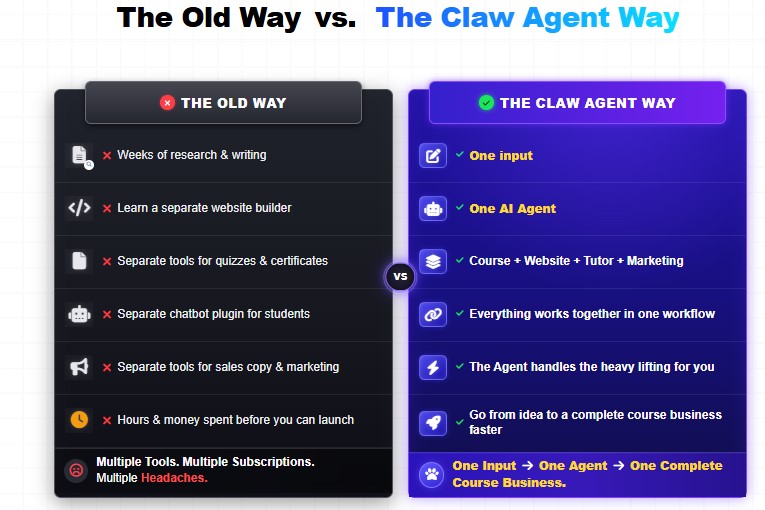
A creator can normally end up using different products for course drafting, hosting, quizzes, websites, chat support, SEO, email copy and marketing. CourseClawAI Review
CourseClawAI’s pitch is that these pieces sit within one workflow.
For a beginner, that can reduce technical friction.
There’s also value for someone who already owns educational material. Instead of manually transferring an existing presentation or document into a course platform, the upload workflow gives you a faster starting point.
Finally, the commercial license may interest freelancers who want to create educational products for clients rather than selling only their own courses.
Visit the Official CourseClawAI Website
CourseClawAI Pros and Cons
Pros
- Broad course-building workflow rather than a single-purpose tool.
- Supports starting from either a topic or existing content.
- PDF, DOCX, PPT and video uploads are advertised.
- Course website builder included.
- Student dashboard included.
- Quizzes, assignments and assessments included.
- Course-specific tutor feature.
- 450+ DFY courses included.
- Marketing and SEO assets included.
- Payment integration advertised.
- Completion certificates included.
- Hosting and SSL listed as included.
- Multi-language support.
- Commercial license included with the front-end offer.
- Cloud-based, so there’s nothing to install.
- 30-day refund policy advertised.
Cons
- Vendor claims about how quickly complete businesses can be created shouldn’t replace realistic expectations about editing and marketing.
- Ready-made courses will need meaningful customization if you want a distinctive product.
- Marketing assets don’t automatically provide traffic or customers.
- Generated lessons and assessments should be reviewed for factual and educational quality.
- Several advanced capabilities sit behind optional upgrades.
- The official JV funnel graphic, public sales page, and current checkout display different pricing structures, so buyers need to inspect the checkout before adding upgrades.
CourseClawAI Pricing and OTO Breakdown
This part requires some care.
Front-End Price : CourseClawAI Review
The public sales page currently advertises:
CourseClawAI: $14.95 one-time
It also displays the coupon EARLYCLAW for 10% off.
When I checked the actual Launchpad checkout, however, the base checkout total displayed $14.94.
Because launch pricing can change, always use the price shown on the final checkout screen as the amount you’re actually agreeing to pay.
Additional $9.98 Add-On : CourseClawAI Review
The public sales page currently displays an optional Premium Features Add-On for $9.98 one-time.
This shouldn’t automatically be treated as identical to the “Course Business Toolkit” order bump shown in the JV funnel because the vendor uses different names and amounts.
Visit the Official CourseClawAI Website
O
The vendor’s official funnel graphic shows
| Funnel Stage | Product | Published Price |
|---|---|---|
| Front End | CourseClawAI | $17–$37 |
| Order Bump | Course Business Toolkit | $27–$37 |
| OTO 1 | CourseClawAI Pro | $67–$97 |
| OTO 2 | Unlimited Edition | $97–$147 |
| OTO 3 | ClawCourse Club | $97 one-time or $27–$37/month |
| OTO 4 | Agency Edition | $147–$197 |
| OTO 5 | Whitelabel / Reseller | $197–$297 |
Those figures come directly from the official funnel image.
Current Checkout Upgrade Bundle
Here’s where things get interesting.
At the time I checked, the live checkout was offering six upgrades together for $197 one-time.
The checkout lists these reference prices:
| Upgrade | Checkout-Listed Price |
|---|---|
| Pro | $47 |
| Unlimited | $67 |
| Club | $97 |
| Agency | $97 |
| Reseller | $127 |
| Whitelabel | $397 |
The bundle itself is currently advertised at $197 one-time rather than the combined individual reference prices.
That differs from the JV funnel graphic, which combines Whitelabel/Reseller into one fifth OTO.
So I would not publish a statement saying there is one permanent CourseClawAI OTO structure.
The most accurate description right now is that the vendor’s official materials show different launch configurations, and buyers should confirm the exact offer displayed during checkout.
CourseClawAI Bonuses
The public sales page currently promotes a special bonus of 200 reseller licenses for buyers purchasing during the offer period.
The page doesn’t provide enough accessible detail for me to responsibly explain every restriction attached to those licenses, so I wouldn’t advertise them as unlimited or unrestricted without seeing the actual license terms.
The 450+ DFY course library is also included with the core product, although I’d treat that as a built-in feature rather than an affiliate bonus.
Visit the Official CourseClawAI Website
Who Should Buy CourseClawAI
CourseClawAI makes the most sense for people who actually intend to build or sell educational products.
Coaches and Consultants :CourseClawAI Review
If you already teach clients a repeatable process, turning that process into structured lessons can create another way of delivering your knowledge.
Freelancers CourseClawAI Review
The commercial license makes CourseClawAI relevant for freelancers interested in building course products or websites for clients.
Educators and Trainers : CourseClawAI Review
People with existing PowerPoint presentations, PDFs, recorded lessons, or training documents may find the upload workflow particularly useful.
Digital Product Sellers : CourseClawAI Review
If you already understand landing pages, traffic and conversions but don’t have your own course product, the DFY library and course-building tools provide a starting point.
Beginners : CourseClawAI Review
A beginner who doesn’t want to configure separate hosting, websites, course delivery and assessment tools may appreciate having those pieces together.
Who Should Avoid CourseClawAI?
CourseClawAI won’t suit everyone.
Skip it if you’re purchasing solely because you expect automatic income.
A finished course doesn’t automatically come with buyers.
You may also want something else if you run a large, established education company with complex reporting, integrations, compliance requirements or highly customized learning workflows. Those buyers should compare specialized learning-management platforms carefully before switching.
Finally, don’t buy every upgrade just because it appears after checkout.
Start with the actual outcome you need.
If you’re creating one course for yourself, agency, reseller and white-label features may offer little immediate value.
10 CourseClawAI FAQs : CourseClawAI Review
1. What is CourseClawAI?
CourseClawAI is a cloud-based platform for building online courses and the supporting business infrastructure, including course websites, student tools, assessments and marketing assets.
2. How much does CourseClawAI cost?
The sales page currently advertises $14.95 one-time, while the live checkout showed $14.94 when checked. Launch pricing can change.
3. Is CourseClawAI a monthly subscription?
The current front-end offer is advertised as a one-time payment. However, the vendor says pricing may move to a recurring model after the launch period, and the official JV funnel also shows a recurring option for ClawCourse Club.
4. Can I upload an existing course?
Yes. The official materials list PDF, DOCX, PPT and video uploads.
5. Does CourseClawAI include hosting?
The sales page says hosting is included, along with SSL for course websites.
6. Can I create quizzes and assignments?
Yes. Quiz, assignment and assessment creation are included in the advertised feature set.
7. Does CourseClawAI include ready-made courses?
Yes. The current offer advertises more than 450 DFY courses that can be imported and edited.
8. Can I use CourseClawAI for clients?
The front-end offer includes a commercial license for creating course products for yourself or clients, subject to its license terms. More advanced agency capabilities are also offered separately.
9. Is there a CourseClawAI refund guarantee?
The product page and Launchpad checkout both state a 30-day refund period.
10. Do I need the CourseClawAI OTOs?
Not necessarily. Which upgrades make sense depends on whether you need higher limits, recurring course resources, agency functionality, reseller rights or white-label capabilities. The core product already contains a substantial feature set.
Final Verdict: Is CourseClawAI Worth It?
After looking through the current offer, I think the most interesting part of CourseClawAI is simply how much of the course workflow it tries to put under one roof.
The front-end isn’t limited to preparing lessons. It includes a website builder, student dashboard, assessments, tutor features, marketing resources, hosting, certificates, payment support, more than 450 ready-made courses and commercial usage rights.
At the current launch price, that’s a long feature list for a relatively small upfront payment.
Still, expectations matter.
A course needs accurate material, good positioning, useful teaching, a credible offer and a way of reaching the right buyers. CourseClawAI may reduce the work involved in assembling the infrastructure, but it doesn’t remove those responsibilities.
The pricing inconsistencies across the official sales page, funnel image and checkout are also worth watching. Check every optional addition before paying rather than relying on an OTO chart published elsewhere.
Bottom line: CourseClawAI is worth considering for creators who want to move from an idea or existing material to a sellable course without stitching together a