
Full Odin AI Review
There’s a point where an AI assistant stops being especially helpful: it gives you a decent answer, then leaves you with another 20 minutes of clicking, downloading, renaming files, entering information, and moving things between apps. Odin AI Review
Odin AI is built around that gap.
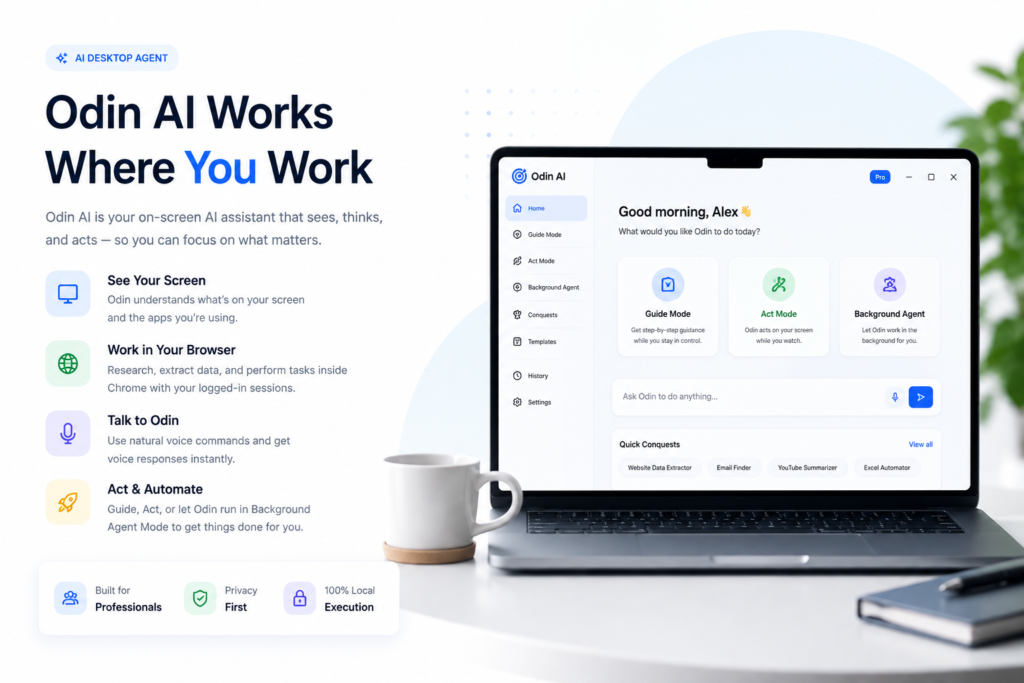
Instead of positioning itself primarily as a chatbot, Odin is sold as a desktop agent that runs on Mac and Windows, sees what is happening on your screen, works through Chrome and local applications, and can carry out multi-step computer tasks. It also supports voice interaction and remote commands through Telegram.
That idea is interesting. It also deserves a little more scrutiny than the sales page gives it.
The practical question isn’t whether autonomous desktop software sounds impressive. It’s whether Odin can remove enough repetitive computer work from your day to justify buying another tool — especially once the optional upgrades enter the picture.
Quick Verdict
Odin AI makes the most sense for freelancers, marketers, creators, consultants, virtual assistants, and other people who repeatedly perform browser, research, file-management, data-gathering, and administrative tasks.
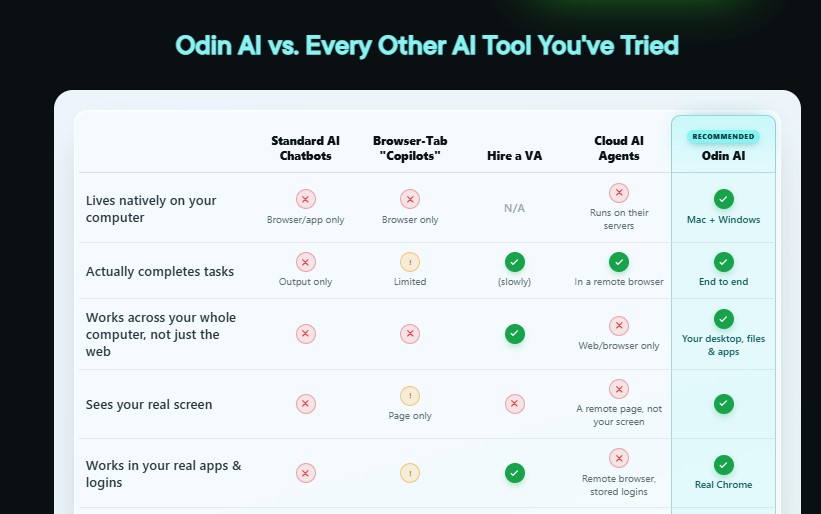
Its biggest distinction is architectural: the vendor says the desktop automation and screen interaction happen locally on your computer, while AI requests go directly to the model provider you choose. Odin also works inside browser sessions you’ve already logged into rather than asking the vendor to store your credentials.
The Personal version is more limited than the sales pitch may initially suggest. Background Agent Mode is capped at five tasks per day, one at a time, and Telegram-triggered tasks are also limited to five per day. Pro Unlimited removes those restrictions and expands the license to three computers.
So the front-end looks most sensible as an affordable way to see whether desktop-agent automation actually fits your workflow. Heavy users should pay much closer attention to the upgrade costs before deciding.
There is another point worth knowing: the main HeyOdinAI website currently describes Odin as being in “Private beta,” while its sales and JV pages actively market paid access. I would confirm the exact release/access status at checkout rather than assuming the general website has been fully updated.
What Is Odin AI?
Odin AI is a desktop automation agent created around a simple idea: instead of only producing answers, it should interact with your computer and complete parts of the task itself.
The sales material names Neil Napier and Ijlal Ahmed as the people behind the product. Napier is presented as the business/product side of the project, while Ahmed is identified as the technical architect.
The software is designed for Mac and Windows. According to the product page, it can see the active screen, interact through voice, operate in your existing Chrome sessions, research online, work with files, and perform actions inside desktop applications. Odin AI Review
The three operating modes are central to the product:
Guide Mode shows instructions on your screen while you remain in control.
Act Mode allows Odin to take keyboard and mouse actions while you watch.
Background Agent Mode is intended for tasks you want to delegate and leave running while you do something else.
That progression makes more sense than throwing a new user directly into full automation. Someone uncomfortable with handing software control of the desktop can begin with guidance, move to supervised action, and only then use background execution. Odin AI Review
Key Features
Local-first architecture
This is the feature Odin leans on hardest, and it’s a legitimate point of differentiation. Instead of running your session on a remote server, <cite index=”2-1″>the app, screen-reading, and browser automation all happen on your own machine</cite>, and the vendor states plainly that Odin’s servers never receive your screen or files. If that claim holds up in practice, it’s a real advantage over cloud-hosted agent tools that require you to hand over an always-on remote browser session. It’s also a claim that’s hard for a buyer to verify without technical auditing tools, so treat it as a strong selling point rather than an independently confirmed fact. Odin AI Review
Three working modes
Odin ships with Guide Mode (on-screen step-by-step prompts while you stay in control), Act Mode (it takes the mouse and keyboard and executes hands-free while you watch), and Background Agent Mode, which is the headline feature — you hand off a task and it runs while you do something else. On the Personal license, Background Agent Mode is capped at up to 5 tasks a day, one running at a time, which is a meaningful limitation for anyone hoping to queue up a full day’s workload.
Bring-your-own AI engine
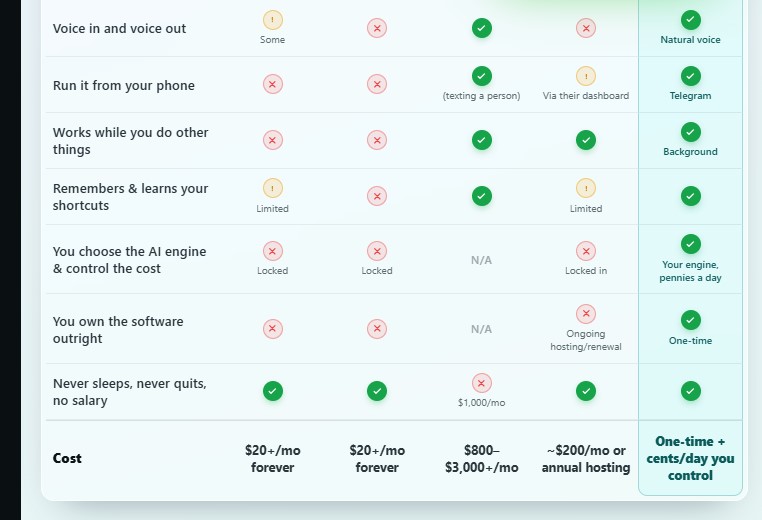
Rather than bundling a fixed AI subscription into the price, Odin connects to an AI model account you set up and control yourself. <cite index=”2-1″>The vendor estimates a full day of heavy use on the recommended model costs roughly $0.20 to $0.50, with free models available at no cost</cite>. That’s a genuinely different cost structure than the roughly $200-a-month cloud agent tools the sales page compares itself to — but it also means your real running cost depends on which model you choose and how much you use it, not a flat number the vendor can guarantee.
Phone control via Telegram
You can fire off a task from your phone while away from your desk, and the desktop machine executes it and has the result waiting when you’re back. This only works if the host computer is on and running, which is worth factoring in if you were picturing something closer to a cloud service you can reach from anywhere at any time.
Safety controls
A one-key stop, auto-pause when you touch your own mouse or keyboard, a stated refusal to type stored passwords or card numbers, and a confirmation step before “destructive” actions. These are sensible guardrails for a tool that’s allowed to click around inside your real accounts, though how reliably they trigger in edge cases isn’t something a sales page can settle.
How Odin AI Works
The basic workflow is straightforward.
Step 1: Give Odin a Task
You activate Odin with the desktop hotkey or, where supported, send a request through Telegram.
Step 2: It Plans and Performs the Work
According to the vendor, Odin can research online, download files, navigate websites, interact with existing Chrome sessions, and work inside local applications.
Step 3: Review the Result
Odin returns the completed work or reports that the task is finished.
The vendor gives examples ranging from spreadsheet cleanup and competitor research to content preparation, file organization, proposals, prospect lists, meeting notes, and administrative work. These should be read as examples of intended use rather than guarantees that every workflow will run perfectly without supervision. Odin AI Review
Practical Benefits
The most believable benefit of Odin isn’t “making money while you sleep.” It’s reducing the number of repetitive steps between deciding what needs to happen and actually getting the job finished.
Imagine a freelancer who regularly needs to research competitors, save information, organize it into a spreadsheet, prepare a client summary, and place the final files into a project folder.
A chatbot can help write the summary.
A desktop agent potentially tackles more of the surrounding work.
That distinction could matter for:
- repetitive web research
- gathering data from multiple sources
- organizing files
- spreadsheet preparation
- routine content preparation
- proposal and report assembly
- outreach preparation
- recurring administrative workflows
The sales page explicitly positions Odin for freelancers, creators, consultants, marketers, e-commerce sellers, researchers, recruiters, administrators, virtual assistants, and other knowledge workers.
I’d narrow that claim a bit.
2
Odin AI Limitations and Trade-Offs
The Personal Version Has Meaningful Limits
The entry-level version allows up to five Background Agent tasks per day, with one running at a time. Telegram-triggered tasks are also capped at five per day.
For occasional automation, that may be enough.
For someone attracted by the idea of running multiple workflows all day, the upgrade cost becomes part of the real purchase decision.
The Computer Needs to Be Available
Odin operates on your own machine rather than a remote hosted computer. That local-first design has privacy advantages, but it also means the machine performing the work needs to be running. The sales page itself explains that Odin’s actions occur on your computer.
A cloud-based agent can sometimes keep running even after your laptop is closed. Odin’s architecture trades that advantage for local execution.
You Still Need to Review Important Work
Screen-reading agents can misunderstand context, click the wrong element, misinterpret unusual layouts, or encounter unexpected website behavior. Odin AI Review
The existence of stop controls and confirmation prompts is useful, but I would still supervise a new workflow before trusting it in the background.
Running the Model Can Cost Extra
The platform is marketed as a one-time software purchase, but Odin relies on an AI model connected through the user’s own account. The vendor therefore separates the software purchase from model usage costs.
That is not necessarily a problem. It just needs to be included in the budget.
“Lifetime” Has a Defined Meaning
A detail buyers could easily miss appears in the FAQ: the vendor defines the product’s lifetime as five years, during which it says the platform will continue to be maintained.
That is much more useful information than simply seeing the phrase “lifetime updates.”
Public-Site Status Is Slightly Confusing
The main HeyOdinAI website currently says “Private beta · Mac & Windows,” despite the separate sales and JV pages offering the product commercially.
This may simply be an outdated public homepage, but it is still something I would verify before paying.
Odin AI Pros and Cons
Pros
- Runs as a Mac/Windows desktop application rather than only inside a web page.
- Offers three levels of assistance: Guide, Act and Background Agent.
- Can use existing Chrome sessions instead of requiring stored vendor-side credentials.
- Supports voice input and output.
- Includes Telegram-based remote task triggering.
- Lets users choose the AI engine rather than locking them into one model.
- Personal license includes commercial/client-use rights.
- Provides explicit stop and confirmation controls.
- Front-end comes with a 14-day refund policy.
Cons
- Personal Background Agent use is capped at five tasks daily.
- Only one background task can run at a time on Personal.
- Heavy usage pushes buyers toward a substantially more expensive Pro upgrade.
- AI-model usage may create additional ongoing costs.
- Local execution means the desktop machine needs to remain available.
- New workflows should be supervised before being trusted with autonomous execution.
- The public homepage still says “Private beta,” which creates some uncertainty around the product’s broader release status.
- The term “lifetime” is defined by the vendor as five years.
Odin AI Pricing & OTO Breakdown
The official JV commission breakdown reveals the launch funnel prices: $37 for the front end, $297 for OTO 1, $97 for OTO 2, and $397 for OTO 3. The published commission figures are 50% of those amounts.
| Offer | Published Launch Price | Main Purpose |
|---|---|---|
| Odin AI Personal | $37 one-time | Core desktop agent |
| OTO 1: Pro Unlimited | $297 one-time | Removes usage limits, 3-computer license |
| OTO 2: Conquest Pack | $97 one-time | 30+ prebuilt workflows |
| OTO 3: Agency License | $397 one-time | Up to 100 client deployments |
| Silver Bundle | $297 one-time | Personal + Pro + Conquest Pack and bundle extras |
| Gold Bundle | $497 one-time | Silver package + Agency License |
The bundle page currently lists the Silver and Gold configurations and describes Gold as the tier that adds the 100-client Agency License, client-management tools and VIP support.
Because the site repeatedly describes these figures as launch pricing and says pricing can change, check the checkout amount before purchasing. Odin AI Review
Front End: Odin AI Personal — $37
The Personal license includes the desktop platform, screen vision, voice interaction, all three operating modes, Telegram control, bring-your-own AI engine, safety controls, client-use rights and one-computer installation.
For a first-time buyer, this is the logical place to evaluate whether the underlying workflow actually saves useful time.
OTO 1: Odin AI Pro Unlimited — $297
Pro Unlimited removes the stated daily Background Agent cap, permits parallel tasks, expands installation to three computers, provides unlimited phone control, unlocks all five listed voices, extends memory/history to 30 days and adds priority support.
This is the upgrade most relevant to genuine heavy users.
The large jump from $37 to $297 also means I wouldn’t buy it merely because “unlimited” sounds attractive. First determine whether the Personal limits are actually getting in your way.
OTO 2: Odin Conquest Pack — $97
The Conquest Pack contains 30+ ready-made workflows covering areas such as finance, outreach, content and administration, with the vendor stating that more Conquests will be added monthly.
This upgrade is less about increasing raw capacity and more about avoiding the blank-page problem of deciding how to structure automation tasks.
Experienced automation users may prefer building their own processes. Newer users could get more value from the ready-made starting points.
OTO 3: Odin AI Agency License — $397
The published individual funnel lists the Agency License at $397. It is intended for businesses that want to deploy Odin on up to 100 client machines and manage those installations as a service.
This is not necessary for someone who simply wants Odin for personal or ordinary client deliverables. The Personal and bundle licenses already include commercial use for producing client work; the Agency tier is about installing/managing Odin itself for clients.
Odin AI Bundle: Silver vs. Gold
The bundle route changes the economics considerably.
Silver Bundle — $297
The official bundle page says Silver includes:
- Odin AI Pro
- Pro Unlimited
- three-computer license
- unlimited phone control
- all five listed voices
- 30-day memory
- Conquest Pack
- commercial/client-use rights
- priority support
- bundle training
- nine listed bonuses
It does not include the 100-seat Agency License or client-management dashboard.
For someone already intending to buy Pro Unlimited and the Conquest Pack, Silver deserves a close look.
Gold Bundle — $497
Gold adds:
- Agency License
- up to 100 client seats
- client-management dashboard
- VIP support
- agency-related bonuses
The rest of the core system mirrors the Silver package.
Gold makes sense only if client deployment is genuinely part of your business plan.
Buying an agency license because you might someday start an agency is rarely a good reason to spend another $200.
Odin AI Bonuses
Front-End Bonuses
The main sales page currently identifies three launch bonuses:
- AI for Productivity Video Upgrade
- 4-Hour CEO Operating System
- AI Tool Stack Optimizer
The vendor assigns promotional values of $197, $197 and $147 respectively. Those values come from the seller and should not be treated as independently established market prices.
The bonuses at least fit the product instead of being random PLR downloads.
Bundle Bonuses
The official bundle page lists additional productivity, automation, content and outreach resources. Silver receives nine listed bonuses, while Gold adds three agency-related items. The bundle also includes a 10-Day Odin Mastery Sprint that the vendor describes as bundle-only.
Again, I’d value the bundle based primarily on the software features you need, not the advertised dollar total assigned to bonuses.
Who Should Consider Odin AI?
Freelancers
If a meaningful part of your day is spent on repetitive research, proposals, reports, file organization or client admin, Odin’s commercial-use license could be relevant.
Affiliate and Digital Marketers
The vendor specifically positions Odin for competitor research, product-review preparation, content batches and campaign work.
The appeal here is less about writing one article and more about handling the research and surrounding desktop work.
Virtual Assistants
A VA who repeatedly performs structured browser and administrative workflows could potentially delegate parts of those processes while retaining human review.
Content Creators
Research, asset gathering, outlines, repurposing and file handling are all workflows promoted by the vendor.
Consultants and Small Agencies
These users may benefit if the agent reduces the preparation work around client deliverables. The Agency License is relevant only if they intend to deploy Odin itself to client machines.
Busy Knowledge Workers
Odin makes more sense when your day contains recurring low-judgment computer chores rather than primarily creative or strategic work.
Who Should Avoid Odin AI?
You probably don’t need Odin if most of your computer work is unique, highly sensitive, or requires constant human judgment. Odin AI Review
It also makes less sense if you:
- rarely perform repetitive desktop tasks
- already have dependable automation covering your workflows
- don’t want autonomous software interacting with your computer
- need cloud automation that continues after your computer is shut down
- expect perfect autonomous performance immediately
- dislike managing a separate model/API account
- want guaranteed income rather than productivity software
- are considering the Agency License without a real client-service plan
The biggest purchasing mistake would be buying Odin because “AI agents are the future” without identifying even three recurring jobs you would delegate to it.
10 Odin AI FAQs
1. What does Odin AI actually do?
Odin AI is a Mac and Windows desktop agent designed to see your screen, interact with your browser and applications, research information, work with files, and complete multi-step computer tasks.
2. How much does Odin AI cost?
The published launch funnel lists Odin AI Personal at $37 one-time. The optional standalone upgrades are Pro Unlimited at $297, Conquest Pack at $97 and Agency License at $397. Pricing is promoted as launch-dependent and may change.
3. Does Odin AI have monthly fees?
The sales page describes the Personal software license as a one-time purchase without a monthly Odin platform fee. However, users connect their own AI engine, so model usage can create separate costs.
4. Does Odin AI work on Windows and Mac?
Yes. The sales page lists both Windows and Mac support.
5. Can Odin AI work while I’m away from my computer?
Background Agent Mode is designed for delegated tasks, and Telegram can be used to send commands remotely. Because Odin runs on the local computer, that machine still needs to be available to perform the work.
6. Is Odin AI unlimited?
Not on the Personal tier. Background Agent Mode is currently listed at five tasks per day with one running at a time, while phone-triggered tasks are also capped at five per day. Pro Unlimited removes the stated caps.
7. Can I use Odin AI for client work?
Yes. The Personal license includes commercial/client-use rights for creating client deliverables. The separate Agency License is required for the broader model of deploying Odin itself across client machines.
8. Does Odin AI have a refund policy?
The official refund page provides a 14-day refund or replacement window for products, while the Odin sales page also advertises a 14-day satisfaction guarantee.
9. Is Odin AI really a lifetime deal?
The seller describes the purchase as one-time and uses “lifetime” language, but its FAQ specifically defines the product lifetime as five years. That detail is worth knowing before purchasing.
10. Is Odin AI worth buying?
It can be worth considering if you have repetitive desktop workflows that involve research, browsers, files, spreadsheets or administrative tasks. The $37 Personal license is the lower-risk entry point; Pro and Agency upgrades make sense only when their extra capacity or licensing rights solve a real need.
Final Verdict
Odin AI’s core idea — an AI that executes on your own machine instead of just describing what to do — is a genuinely useful direction, and the local-first architecture is a real point of difference from most cloud-based agent tools on the market right now. For a freelancer, marketer, or small agency with a steady stream of research, formatting, and file-assembly work, handing that off to a background process is a sensible use case, and the included commercial license removes a common restriction other AI tools apply at this price point. Odin AI Review
The bigger question isn’t whether the technology category is useful — agentic AI clearly is, and that’s not unique to this product. It’s whether this specific funnel is priced and structured the way the front page implies. The gap between “one-time payment” messaging on the main sales page and “reverts to an annual fee” language on bundle-promotion material is the single thing worth resolving before you buy, along with the daily task cap on the entry tier if background automation is the main reason you’re interested. Buyers who lean toward occasional, lighter use are probably better served by the front-end alone within the refund window; buyers expecting to run it constantly or resell it to clients should read the Silver/Gold terms closely rather than assuming the launch price is permanent. Odin AI Review