Introduction
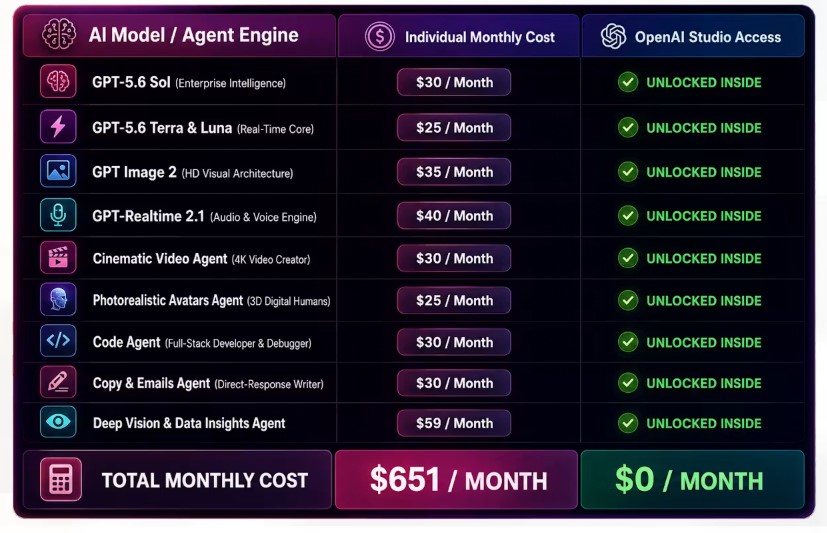
Anyone who creates content with AI regularly knows the drill: one tab for writing, another for images, a third for video, and a login somewhere else for transcription or voiceovers. It adds up — in cost, in tab-switching, and in the time spent re-explaining the same brief to five different tools. OpenAI Studio Review
OpenAI Studio is a newly launched software that tries to solve that problem by putting 13 task-specific AI agents inside a single browser dashboard. Before you buy, though, it’s worth understanding exactly what’s included, what’s an upsell, and which marketing claims still need to be checked against the live app. That’s what this OpenAI Studio review sets out to do.
A quick note up front: despite the name, this is a third-party product built by an independent developer. It is not an official OpenAI release, and buyers shouldn’t assume otherwise.
Quick Verdict
OpenAI Studio looks most interesting as a low-cost, third-party, multi-purpose AI dashboard for marketers, creators, freelancers, and small agencies that want many content-generation functions in one interface.
The launch price is surprisingly low considering the number of capabilities advertised. Moreover, the front-end includes a commercial-use license according to the sales page, plus five launch bonuses and a stated 30-day refund policy.
However, I would approach the offer with realistic expectations.
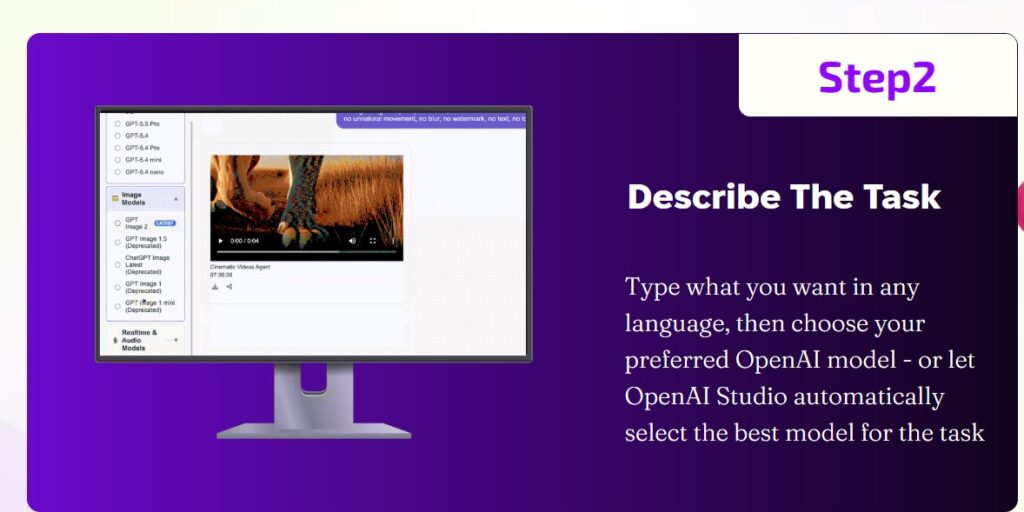
The strongest claims—including unrestricted generation, automatic access to future OpenAI models, 4K video production, near-perfect transcription accuracy, and lifetime access without recurring API charges—are vendor claims rather than independently verified performance benchmarks.
There is another important limitation: although the JV page confirms that the funnel contains multiple OTOs, it does not publicly disclose the individual OTO names and prices in the accessible material. Therefore, any review publishing a detailed OTO price list without additional checkout evidence would be guessing.
What Is OpenAI Studio?
OpenAI Studio is marketed as a cloud-based AI content and productivity platform that combines multiple specialized AI agents within one dashboard.
According to the sales page, users can generate or work with:
- Marketing copy
- Emails
- Emails
- Sales pages
- Code
- Web applications
- Images
- AI avatars
- Videos
- Voiceovers
- Music
- Transcription
- Spreadsheet and mathematical analysis
- Image analysis
- Webpage analysis
- Social media content
- Proofreading
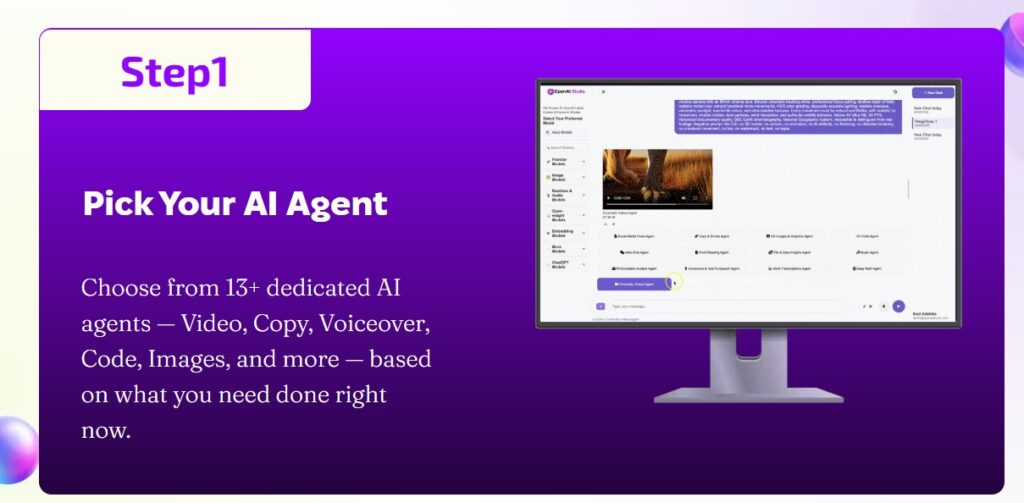
The vendor repeatedly describes the platform as having 13+ AI agents, although the main visible feature stack explicitly names twelve specialized agents in one section.
Importantly, OpenAI Studio should not be confused with ChatGPT or other software directly operated by OpenAI. The product’s own legal disclaimer states that it is not affiliated with the companies named on its page.
OpenAI Studio Key Features
1. Multiple AI Functions in One Dashboard
The central selling point is convenience.
Instead of opening separate applications for writing, graphics, voice, transcription, video, coding, and analysis, OpenAI Studio aims to bring those tasks into one web-based interface.
The vendor describes this as a centralized AI command center and promotes 13+ specialized agents.
For creators who regularly move between several AI tools, that approach could reduce workflow friction.
2. AI Copywriting and Email Generation
The Copy & Emails Agent targets digital marketers, affiliate marketers, agencies, and online businesses.
According to the sales page, it can create:
- VSL scripts
- Email sequences
- Sales-page copy
- Headlines
- Facebook ad copy
- Promotional campaigns
The platform also says its copy workflows use direct-response structures. However, users should still fact-check generated marketing content and edit it for brand voice, accuracy, and compliance.
3. Code and Web Application Generation
OpenAI Studio includes a Code Agent that the vendor says can generate, explain, and debug code.
The advertised use cases include HTML, CSS, JavaScript, Python, web applications, scripts, landing pages, and other development tasks.
This could help non-developers prototype ideas more quickly.
However, no AI-generated code should automatically be assumed secure, production-ready, or error-free. If you use generated code commercially, review and test it carefully before deployment.
4. AI Video Creation
The platform advertises a Cinematic Video Agent for creating video advertisements, Shorts, Reels, and other promotional assets.
The sales page specifically promotes 4K video output, image-to-video animation, realistic lighting, avatars, lip-sync, and cinematic effects.
These are vendor-stated capabilities. I did not find an independent technical benchmark establishing output resolution, generation consistency, rendering limits, or comparable quality against specialist AI-video platforms.
Therefore, video quality should be judged from actual dashboard tests rather than marketing screenshots alone.
5. Photorealistic AI Avatars
Another advertised feature is the ability to generate digital humans and spokesperson-style avatars.
The vendor promotes realistic expressions, eye contact, lip-sync, and animated spokesperson content.
Potential use cases include:
- Product explainers
- Promotional videos
- Training content
- Social media clips
- Presentations
- Client advertisements
As always, businesses should use AI-generated likenesses responsibly and avoid impersonating real individuals without permission.
6. AI Voiceovers and Text-to-Speech
The Voiceover & TTS functionality targets creators who need narration without recording their own audio.
The sales page advertises multilingual voices with natural pitch, emotion, and cadence.
That could be useful for:
- YouTube videos
- Courses
- Explainer content
- Sales presentations
- Short-form videos
- Podcast-style content
Actual voice quality, language coverage, pronunciation accuracy, and generation limits should be tested individually.
7. AI Music and Jingle Generation
OpenAI Studio also advertises an AI music component.
According to the vendor, users can generate original background scores, jingles, and other audio assets.
This potentially eliminates another tool from a creator’s workflow.
Nevertheless, anyone using generated music commercially should review the platform’s current licensing terms and the relevant intellectual-property requirements in their jurisdiction.
8. Audio Transcription
The platform promotes audio-to-text transcription for meetings, podcasts, calls, and related files.
However, the page uses particularly aggressive accuracy language, including a claim of near-100% transcription accuracy.
That level of accuracy should not be assumed across accents, noisy recordings, technical terminology, multiple speakers, or low-quality audio unless you test it yourself.
9. Spreadsheet and Data Analysis
Users can reportedly upload spreadsheets or financial reports and ask the platform to analyze the information.
Advertised functions include:
- Data insights
- Mathematical calculations
- Charts
- Spreadsheet interpretation
The page also promotes image analysis through its Deep Vision Agent.
This could be useful for basic business analysis. Nevertheless, AI-generated financial, legal, medical, or other high-stakes conclusions should always receive appropriate professional review.
10. Webpage Chat and Analysis
OpenAI Studio says users can provide a webpage URL and interact with the content through an AI chat interface.
The advertised use cases include summarizing pages, extracting information, and conducting basic research.
This is potentially useful for marketers, researchers, and content creators who regularly analyze competitor pages or reference material.
11. Social Media Content Generation
The sales-page feature list also includes a Social Media Posts AI Agent.
It targets content for networks such as TikTok, X, and Facebook.
As with any automated social-content system, the primary advantage would be ideation and drafting speed rather than guaranteed engagement. OpenAI Studio Review.
12. Proofreading
A proofreading and document-rewriting agent also appears in the advertised feature stack.
That makes the platform potentially useful for:
- Blog editing
- Email cleanup
- Grammar correction
- Marketing copy refinement
- Client-document editing
Again, sensitive or specialist content should receive human review before publication.
13. Commercial License
The sales page says the front-end purchase includes commercial rights to generated assets.
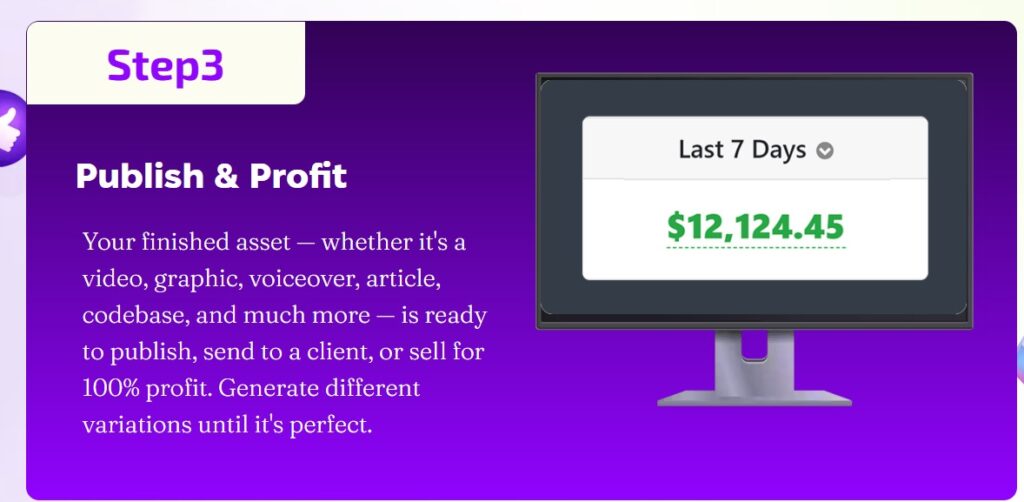
According to the vendor, users can create and sell client deliverables such as copy, code, voiceovers, graphics, and videos without paying additional royalties to the platform.
However, a platform’s commercial-use permission does not automatically guarantee that every AI-generated output receives copyright protection or that every output is free from third-party intellectual-property issues.
Therefore, commercial users should distinguish between the software vendor granting permission to use output and the broader legal status of AI-generated content.
Key Benefits
- Fewer logins and subscriptions. Consolidating copy, image, video, audio, and coding tools into one dashboard can reduce the number of separate tools a solo marketer or small team has to manage.
- Guided prompting. Dedicated settings per agent (audience, tone, language, framework) give the AI more context than an open-ended chat request, which can produce more usable first drafts.
- Beginner accessibility. Voice input, Auto Mode, and preconfigured agents lower the technical bar for people without prompt-engineering experience.
- Built-in export options. Converting a caption into an image, exporting copy as a Word file, or downloading a generated video keeps more of the workflow inside one tab.
- Low entry price relative to running several subscriptions. At a launch price under $20, the front-end is inexpensive to test against your actual use case. OpenAI Studio Review
OpenAI Studio Pros and Cons
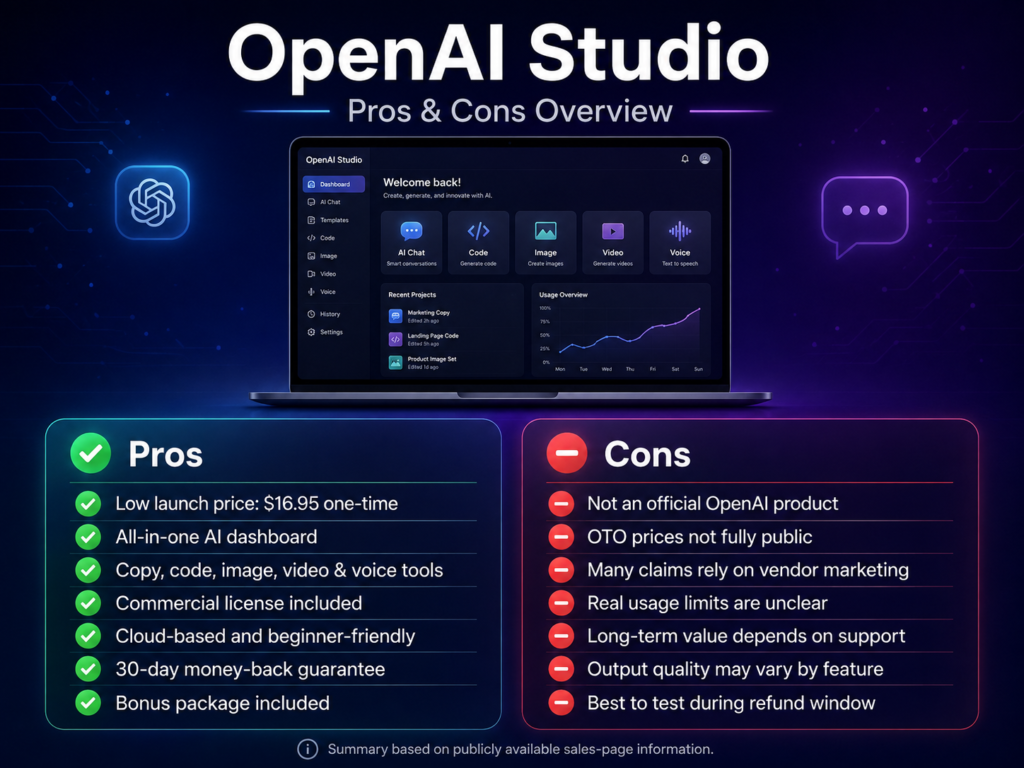
Pricing & Complete OTO Breakdown
Front-End: OpenAI Studio
Verified advertised launch price: $16.95 one-time
The sales page repeatedly advertises lifetime front-end access for this payment during the launch period.
Important Pricing Warning
The product page is not consistent about the supposed regular or future price.
Different sections reference:
- $97/month as a regular retail price
- $197/month after the launch
- $297/month in another value comparison
Therefore, I would not treat any specific post-launch price as verified. Only the currently displayed $16.95 launch offer appears consistently across multiple sections of the page.
Prices can also change without notice.
OpenAI Studio OTOs / Upsells
Here is the most accurate OTO breakdown available from the supplied public sources:
| Funnel Stage | Verified Information |
|---|---|
| Front End | OpenAI Studio — $16.95 one-time launch price |
| OTO 1 | Exists, but exact public name and price not verified |
| OTO 2 | Exists, but exact public name and price not verified |
| Additional OTOs | JV page confirms a stacked multi-OTO funnel, but public pricing is not disclosed |
| Upgrade Types Mentioned | More render credits, additional voices, more seats, and agency-license tiers |
The JV page explicitly states that commissions apply across the front end and every OTO. It also describes upgrade opportunities involving more rendering credits, additional voices, extra seats, and agency license tiers. However, the accessible JV information does not provide a complete itemized upgrade-price table.
Therefore, I will not invent OTO names or prices.
If another review gives exact upgrade prices, check whether that reviewer provides checkout screenshots or another direct source.
Bonuses
Bonus packages for launches like this are typically offered by individual affiliates and marketplaces rather than by the vendor directly, and they vary from one promoter to the next. Because bonus contents are not standardized or verifiable from official product documentation, we’re not listing specific bonus claims here — check the exact bonus stack on whichever page you plan to purchase from, and confirm delivery terms before buying based on a bonus offer.
OpenAI Studio Refund Policy
The sales page advertises a 30-day money-back guarantee.
It says buyers can contact the vendor for a refund if the product does not meet expectations.
However, another disclaimer on the same page references a conditional guarantee and says qualification can require evidence that the customer used the product, performed the work, requested support, and still could not resolve the issue.
Because those statements create some ambiguity, buyers should read the checkout refund terms and current Terms & Conditions before purchasing OpenAI Studio Review
Who Should Buy It?
- Affiliate marketers and solo content creators who want a single place to draft promos, captions, and simple visuals.
- Freelancers producing first-draft copy, code, or graphics for clients, provided they read the commercial license before selling generated assets.
- Small business owners without an in-house creative team who need everyday marketing material.
- Beginners who find a blank AI chat window intimidating and prefer guided settings.
Who Should Avoid It?
- Professionals who need deep, specialist controls — an experienced video editor, developer, or audio engineer will likely find more precision in a dedicated tool built for that single task.
- Enterprises with strict compliance or data-governance requirements, given the limited public documentation on privacy and data retention.
- Buyers expecting guaranteed traffic, sales, or income from any of the upsell editions — those are promotional claims, not outcomes the software can contr
SEO-Friendly FAQs About OpenAI Studio
1. What is OpenAI Studio?
OpenAI Studio is a third-party cloud-based AI software platform marketed around multiple specialized agents for copywriting, coding, video, images, avatars, audio, transcription, analysis, and other content-production tasks.
2. Is OpenAI Studio an official OpenAI product?
No official affiliation could be verified. In fact, the product’s own disclaimer says the site and its products are not associated, affiliated, endorsed, or sponsored by businesses mentioned on the page.
3. How much does OpenAI Studio cost?
As of August 8, 2026, the sales page repeatedly advertises a launch price of $16.95 as a one-time payment. Pricing can change after the launch.
4. Does OpenAI Studio charge monthly fees?
The current front-end offer says the $16.95 launch purchase provides lifetime access without a recurring front-end subscription. However, the JV page confirms optional OTO upgrades exist.
5. Does OpenAI Studio have OTOs?
Yes. The JV page explicitly describes a multi-OTO funnel. However, the publicly accessible information I reviewed does not provide verified individual OTO names and prices.
6. Can I use OpenAI Studio for commercial work?
The sales page says the front-end includes commercial-use rights for generated assets. Buyers should still review current licensing terms and applicable intellectual-property laws before delivering AI-generated work commercially.
7. Does OpenAI Studio create videos?
The vendor advertises an AI video agent capable of generating commercials, Shorts, Reels, animations, and other video content. Claims about 4K quality and advanced cinematic output come from the vendor and should be tested directly.
8. Can OpenAI Studio generate voiceovers and music?
Yes, according to the sales page. The platform advertises multilingual text-to-speech voices, background scores, jingles, and related audio-generation capabilities.
9. Does OpenAI Studio offer a refund?
The sales page promotes a 30-day money-back guarantee. However, its disclaimer also references conditions for a guarantee, so customers should review the current checkout and refund terms carefully.
10. Is OpenAI Studio worth buying?
It may be worth considering for marketers, creators, freelancers, and small agencies that want to test multiple AI-content functions inexpensively. However, buyers who require verified enterprise infrastructure, guaranteed unrestricted usage, or first-party OpenAI support should consider established alternatives.
Final Verdict: Should You Buy OpenAI Studio?
This OpenAI Studio Review reveals a product with an appealing central idea: put many common AI-creation tasks inside one dashboard and remove the need to constantly switch between specialized tools.
The advertised $16.95 one-time launch price also makes the front-end inexpensive compared with most mainstream subscription software. Furthermore, the platform promotes commercial rights, five bonuses, and a 30-day refund policy.
However, potential buyers should separate the interesting concept from the more aggressive sales-page claims.
The page advertises unrestricted usage, future model upgrades, cinematic video, near-perfect transcription, very fast generation, and significant income opportunities. Those claims have not all been independently verified.
Additionally, the product is not an official OpenAI offering, the future monthly-price claims are inconsistent across the sales page, and complete public OTO pricing is unavailable. OpenAI Studio Review
Therefore, I would view OpenAI Studio as a low-cost experimental all-in-one AI toolkit rather than a guaranteed replacement for every professional AI platform.
If the features you need work well inside the actual dashboard, the front-end could offer strong value for the price. However, test the important functions during the refund window and confirm usage limits, commercial terms, and upgrade requirements before building your business workflow around it.